No credit card required
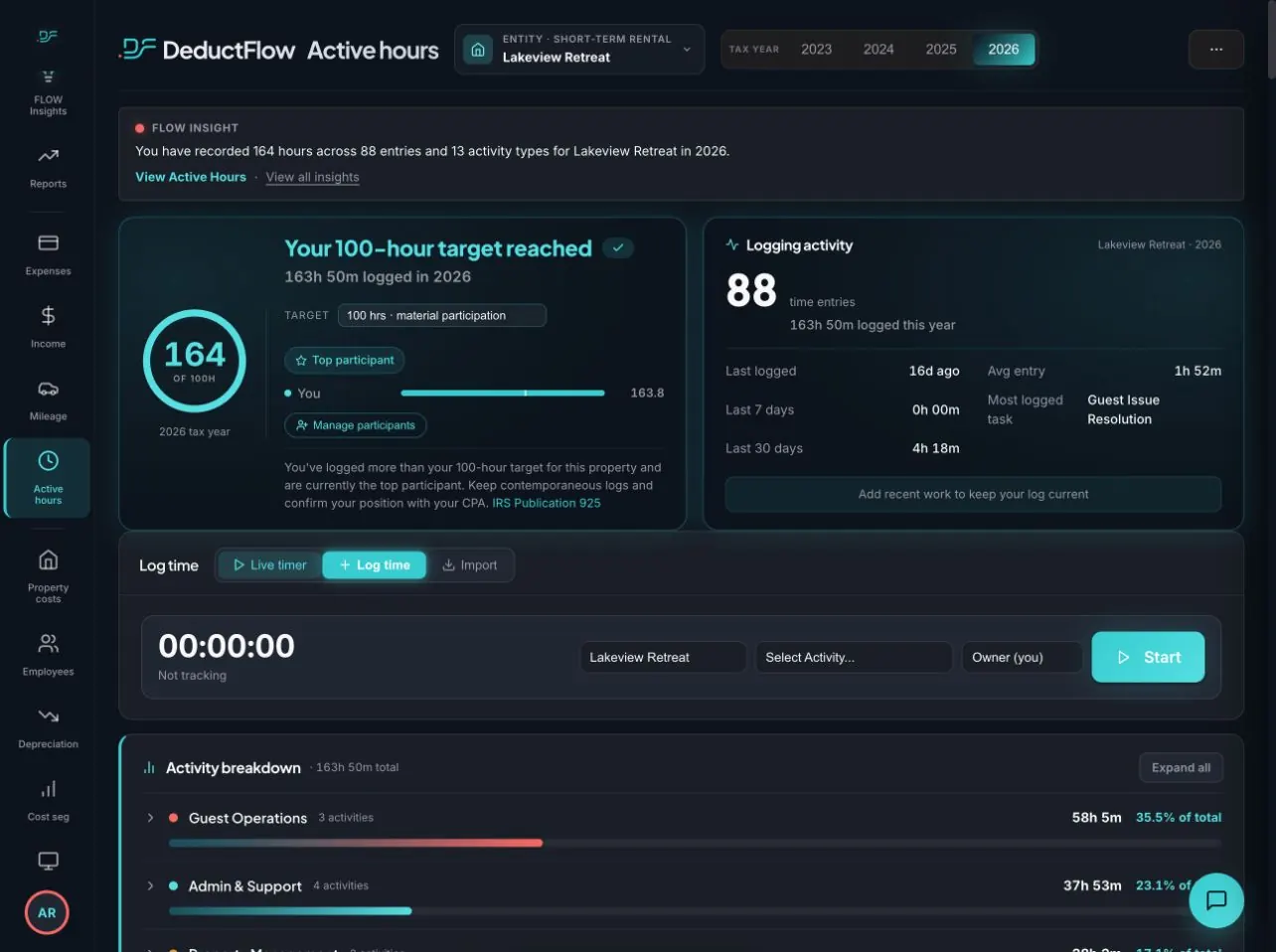
Stop guessing at tax time. DeductFlow's Active Hours Tracker logs every hour you work on your short-term rental, builds an IRS-compliant record toward the 100-hour material participation test, and generates a CPA-ready export in one click.
Why It Matters
The IRS Publication 925 outlines seven tests for material participation. For most short-term rental investors, the most accessible path is the 100-hour test: participate in the rental activity for more than 100 hours during the year, and more than any other individual. Meet that threshold and your STR losses can offset ordinary W-2 income instead of being trapped as passive losses — a strategy worth tens of thousands of dollars annually for high earners.
The problem is documentation. The IRS does not accept ballpark estimates. When an STR investor claims material participation in an audit, the examiner expects a log — dates, activity types, durations, and participant names. Without that log, the losses get reclassified. The deduction disappears. And in many cases, so does the entire tax strategy that justified the investment.
Most STR investors are tracking their hours in spreadsheets, notes apps, or not at all. That changes the moment they download DeductFlow. You can read the full framework in our guide: The 100-Hour Material Participation Rule Explained for STR Investors.
Feature Walkthrough
DeductFlow was designed around the real workflow of an STR investor — from the moment you unlock your property for a guest inspection to the moment you hand your CPA a complete tax package. Here is what the Active Hours Tracker includes.
Tap once to start a timer, tap again to stop. DeductFlow timestamps each session automatically and prompts you to choose an activity category — guest communication, cleaning, maintenance, bookkeeping, and more — so your log is audit-ready from the first entry.
Forgot to run the timer? No problem. The manual entry form lets you log hours for any past date with a description and activity type. Your total hours count remains accurate whether you log in real time or catch up at the end of the week.
A live progress bar shows exactly where you stand against the 100-hour material participation threshold. Color-coded status — on track, needs attention, goal met — means you never get to December and realize you are 12 hours short.
Own multiple STRs? Each property gets its own dedicated hours tracker in DeductFlow Pro. Track your participation per property, confirm you're meeting the 100-hour test for each one, and see aggregate portfolio totals at a glance.
Under IRS rules, a spouse's participation counts toward your material participation total. DeductFlow lets you log hours under separate participant names — you, your spouse, or named contractors — and the dashboard tracks combined totals alongside individual breakdowns.
One click generates a complete hours log: every entry with date, duration, participant, activity category, and description. Formatted so your CPA can include it directly in their workpaper file or attach it to your return — no reformatting, no copy-paste, no follow-up calls.
Mobile App
No credit card required
The DeductFlow mobile companion is a Progressive Web App (PWA) you can install directly on your iPhone or Android home screen — no App Store download required. Open your browser, tap "Add to Home Screen," and it works like a native app, even offline.
The mobile app is purpose-built for the moment hours happen: when you're at the property, on a call with a guest, or picking up supplies. Quick-tap logging means it takes under three seconds to start a new session. Activity categories appear as large tap targets so you can log and move on without breaking your flow.
How We Stack Up
Hours tracking tools range from $0 spreadsheets to specialty apps. Here is a quick comparison on the features that matter most for STR investors. For the full breakdown, read Best Material Participation Hour Trackers for STR Investors.
| Feature | DeductFlow Pro | REPSLog | Spreadsheet |
|---|---|---|---|
| Price | $19/mo or $149/yr | $9.99/mo | $0 |
| Mobile app (iOS & Android) | Yes — PWA, installs on home screen | Yes | Limited |
| All-in-one STR tax platform | Yes — expenses, mileage, cost seg, hours | No — hours only | No |
| CPA-ready PDF export | Yes — full tax package | Hours only | Manual |
Comparison based on publicly available information as of April 2026. See full comparison guide for details.
Frequently Asked Questions
The most commonly used IRS test for STR investors is the 100-hour test: you must participate in the activity for more than 100 hours during the year, and your participation cannot be less than any other individual's. Meeting this test lets you treat your STR as a non-passive activity and deduct losses against ordinary income. IRS Publication 925 covers all seven material participation tests.
Any work you perform as an owner of the rental activity counts: guest communication, check-in and check-out coordination, cleaning, inspections, maintenance, repairs, bookkeeping, listing management, supply runs, and contractor oversight. Personal use of the property does not count. DeductFlow's activity categories align directly with the types the IRS expects to see documented. See our full guide at The 100-Hour Material Participation Rule Explained.
Yes. Under IRC 469(h)(5), a taxpayer's participation includes the participation of the taxpayer's spouse during the tax year, even if you don't file a joint return. DeductFlow lets you log hours under separate participant names — yourself and your spouse — and the dashboard shows your combined total toward the 100-hour threshold alongside individual breakdowns.
The IRS does not mandate daily contemporaneous logs by regulation, but they are strongly recommended because unsubstantiated estimates are frequently disallowed in audit. The Tax Court has consistently required objective supporting evidence. DeductFlow timestamps every entry the moment you log it, creating the kind of contemporaneous record that holds up under examination.
Without documentation, the IRS can reclassify your STR losses as passive, blocking you from deducting them against W-2 or other ordinary income. You'd carry those losses forward to offset only future passive income or the eventual sale of the property. For high earners this mistake typically costs $10,000–$40,000 or more in a single tax year. Learn more in The Complete Guide to Material Participation for STR Investors.
Yes. DeductFlow Pro generates a CPA-ready PDF that includes a full hours log with dates, durations, activity categories, and participant names. The export covers your entire tax year and is formatted so your tax professional can attach it directly to your return or file it in their workpaper binder.
Yes. DeductFlow Pro supports unlimited properties, each with its own hours tracker. Track your progress toward the 100-hour test per property and view aggregate totals for your entire portfolio. This is especially important when you hold STRs in different states or under different ownership structures.
Yes. The DeductFlow mobile companion is a Progressive Web App (PWA) installable on both iPhone and Android — no App Store required. The mobile app features quick-tap hour logging with activity categories, a live timer, and a manual entry form. All entries sync instantly with your desktop dashboard. It's included with every Pro subscription.
Join STR investors who have replaced guesswork with an IRS-compliant hours log — and the tax savings that come with it.
DeductFlow is a record-keeping tool only. Not tax, legal, or financial advice. Consult a qualified tax professional for guidance specific to your situation.