See how DeductFlow brings rental expenses, mileage, income, and activity records together for a conversation with your CPA. Download a complete three-page example before starting your own records.
Download the sample CPA report (PDF)
No email or account required. All records are fictional. This sample uses DeductFlow’s report format as of September 16, 2026, with example transactions from May 2026.
What is inside the sample?
- A property summary: fictional Pine Cabin, $1,680 in recorded income, and a profit-and-loss summary.
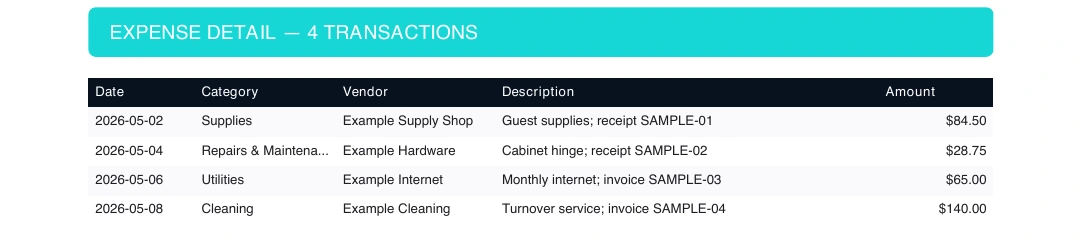
- Four expenses totaling $318.25: supplies, a repair, internet, and cleaning, with vendors and example receipt references.
- Two trips totaling 30 miles: dated entries with the business purpose and the report’s calculated mileage amount.
- Activity by person: 1.75 owner hours and 2 helper hours, shown separately. The report displays hours rounded to one decimal place.
- Income detail: two fictional completed stays, with dates and amounts.
The PDF is an organizational report, not a tax return or a determination that an expense or activity qualifies. Your tax professional reviews classifications and treatment.
Expenses your CPA can follow
Each expense carries its date, category, vendor, description, and amount. The example receipt references show how a description can point back to supporting records; this sample does not include receipt attachments.
Mileage with dates and purpose
The fictional supply pickup is 12 miles; the repair visit is 18 miles. Both entries retain a description of the trip. The PDF shows the calculated amount alongside each entry.

Owner and helper hours kept separate
See who did the work, the activity date, hours, notes, and recorded date. The fictional cabinet repair occurred May 4 and was recorded May 5, making that difference visible.
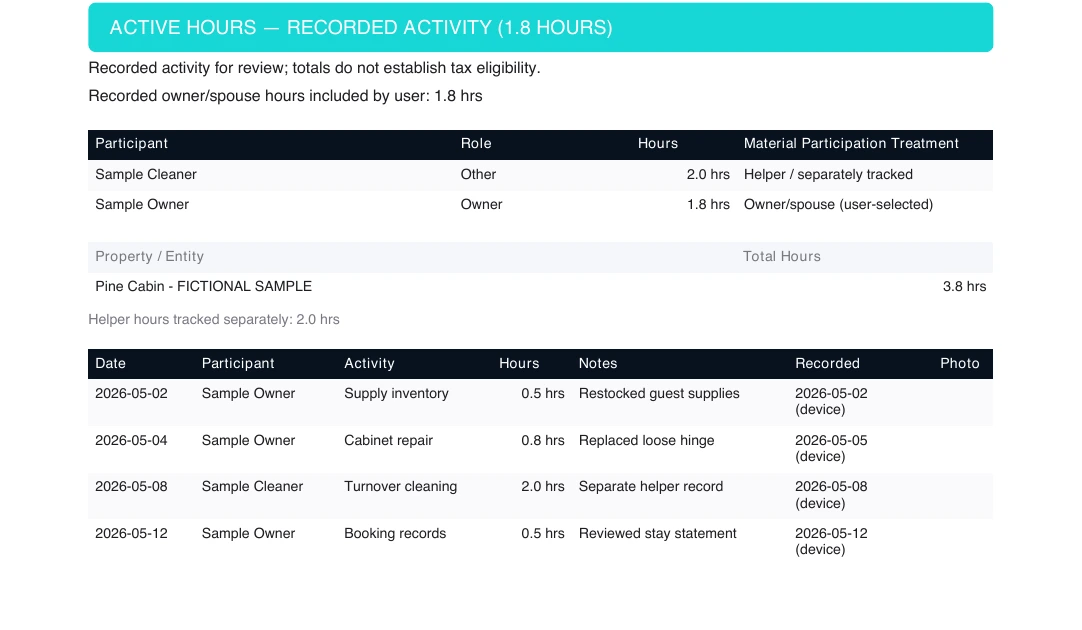
The “device” label identifies a date supplied by the device when a server-recorded date is unavailable. These example dates do not independently verify when work happened. Page 3 explains the recorded-date labels.
Can I create this report during the trial?
You can try desktop tracking for seven days without a credit card. Generating your own reports and exports requires paid Pro; reports, exports, and Mobile Companion are not included in the trial. Pro costs $149/year or $24/month.
Add one property and record your next expense, trip, or activity. The quick-start guide walks through your first entry.
Prefer to start in a spreadsheet?
Download the free hours and expense log, or compare DeductFlow with spreadsheets to choose a workflow.