Which STR tax tracking software fits your workflow?
Choose by the records you need to produce. An expense tracker, a participation log, accounting software, and tax-filing software solve different problems. A bank transaction can show what you paid; it does not record who repaired the property or how long the work took.
 DeductFlow was built to help owners track and organize all aspects of their STR as they strive to maximize its financial value.Explore the app
02 / Connected rental financesStessaBank feeds and portfolio reporting for rental owners.See the fit
03 / Rental bankingBaselaneBanking and property bookkeeping in the same workflow.See the fit
04 / Business accountingQuickBooks OnlineBroader accounting and collaboration with your accountant.See the fit
05 / Automatic mileageHurdlrTrip capture and expense tracking for self-employed work.See the fit
06 / Invoicing & client workFreshBooksInvoices, billable time, and accounting on eligible plans.See the fit
DeductFlow was built to help owners track and organize all aspects of their STR as they strive to maximize its financial value.Explore the app
02 / Connected rental financesStessaBank feeds and portfolio reporting for rental owners.See the fit
03 / Rental bankingBaselaneBanking and property bookkeeping in the same workflow.See the fit
04 / Business accountingQuickBooks OnlineBroader accounting and collaboration with your accountant.See the fit
05 / Automatic mileageHurdlrTrip capture and expense tracking for self-employed work.See the fit
06 / Invoicing & client workFreshBooksInvoices, billable time, and accounting on eligible plans.See the fit
Compare the annual commitment, not just the headline price
These examples use published US-dollar subscription prices checked September 16, 2026. They exclude promotions, taxes, transaction fees, and optional services. The plans serve different needs; the cheapest row is not necessarily the right workflow.
| Plan example | Billing basis | 12-month cost |
|---|---|---|
| Pro | Annual subscription | $149 |
| Stessa Manage | $12/month, paid annually | $144 |
| Baselane Smart | $20/month on annual plan | $240 |
| QuickBooks Simple Start | 12 payments of $38 | $456 |
| Hurdlr Premium | Annual subscription | $100 |
| FreshBooks Lite | 12 payments of $23 | $276 |
DeductFlow Pro month-to-month totals $288 over twelve months. If you need QuickBooks class/location tracking or FreshBooks double-entry reports, compare the relevant higher plan rather than the entry-plan example above. Vendor pricing sources are linked in each review.
Six tools compared: strengths, costs, and what to check
The expense. The drive. The work.
One record of your rental.
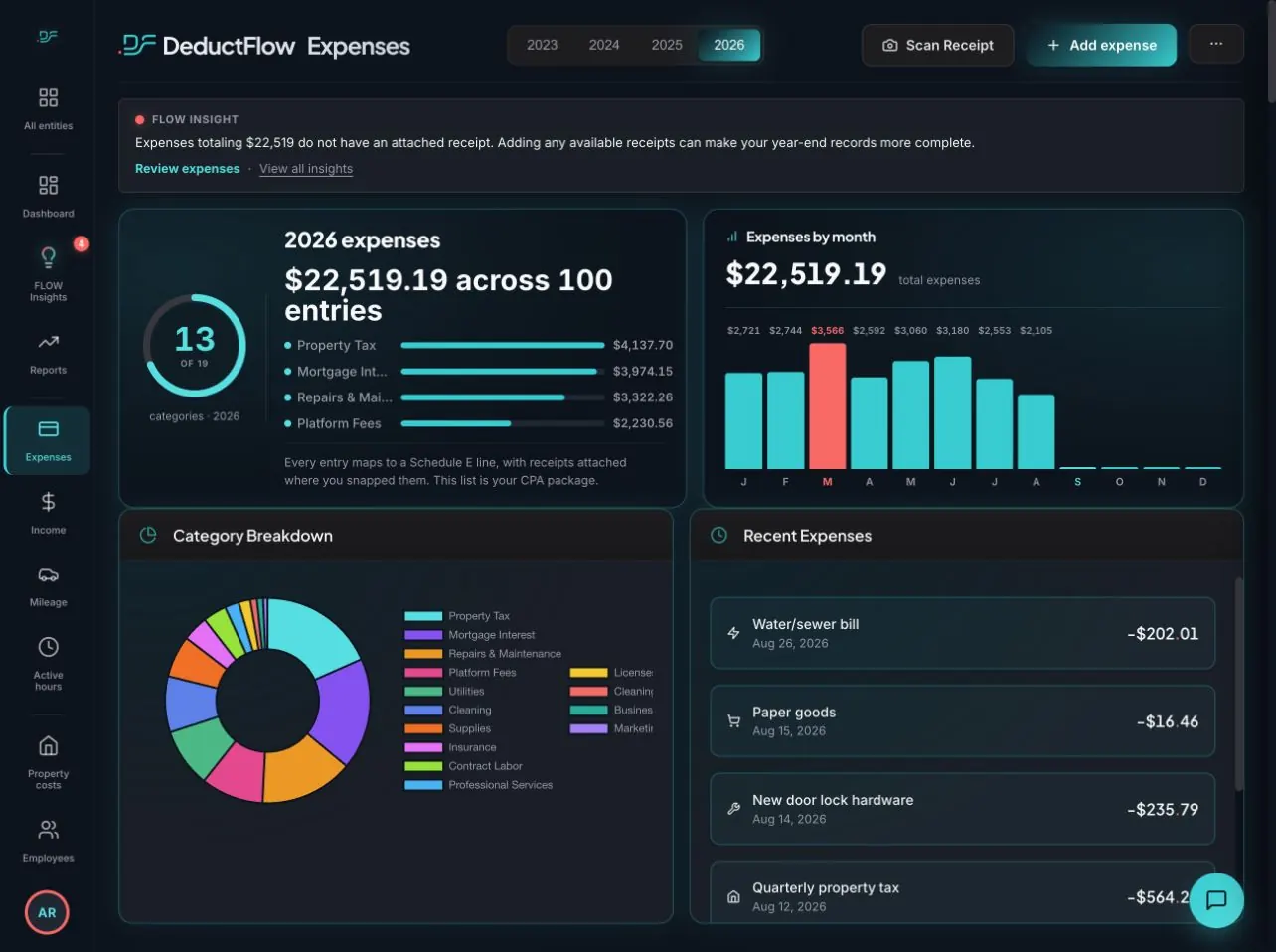
DeductFlow brings expenses, trips, income, and activity records into one property-based workflow. It is a fit for a self-managing host who wants to record both the money spent and the work performed, then review an organized package with a CPA.
Keep the details that matter
- Expense dates, categories, vendors, descriptions, and amounts.
- Mileage entries with the trip date, distance, and business purpose.
- Activity records with person, property, hours, notes, and recorded-date labels.
- A report that keeps owner and helper activity separate.
Where another tool may fit better
- No automatic bank-feed reconciliation.
- Not a double-entry accounting or payroll system.
- Not tax-return preparation or filing software.
- Reports, exports, and Mobile Companion require paid Pro.
A record of the work, too
Log the hours behind the hosting.
Start the timer or add an activity. Keep the property, person, work date, and notes together instead of reconstructing them at year-end.
Explore active hours →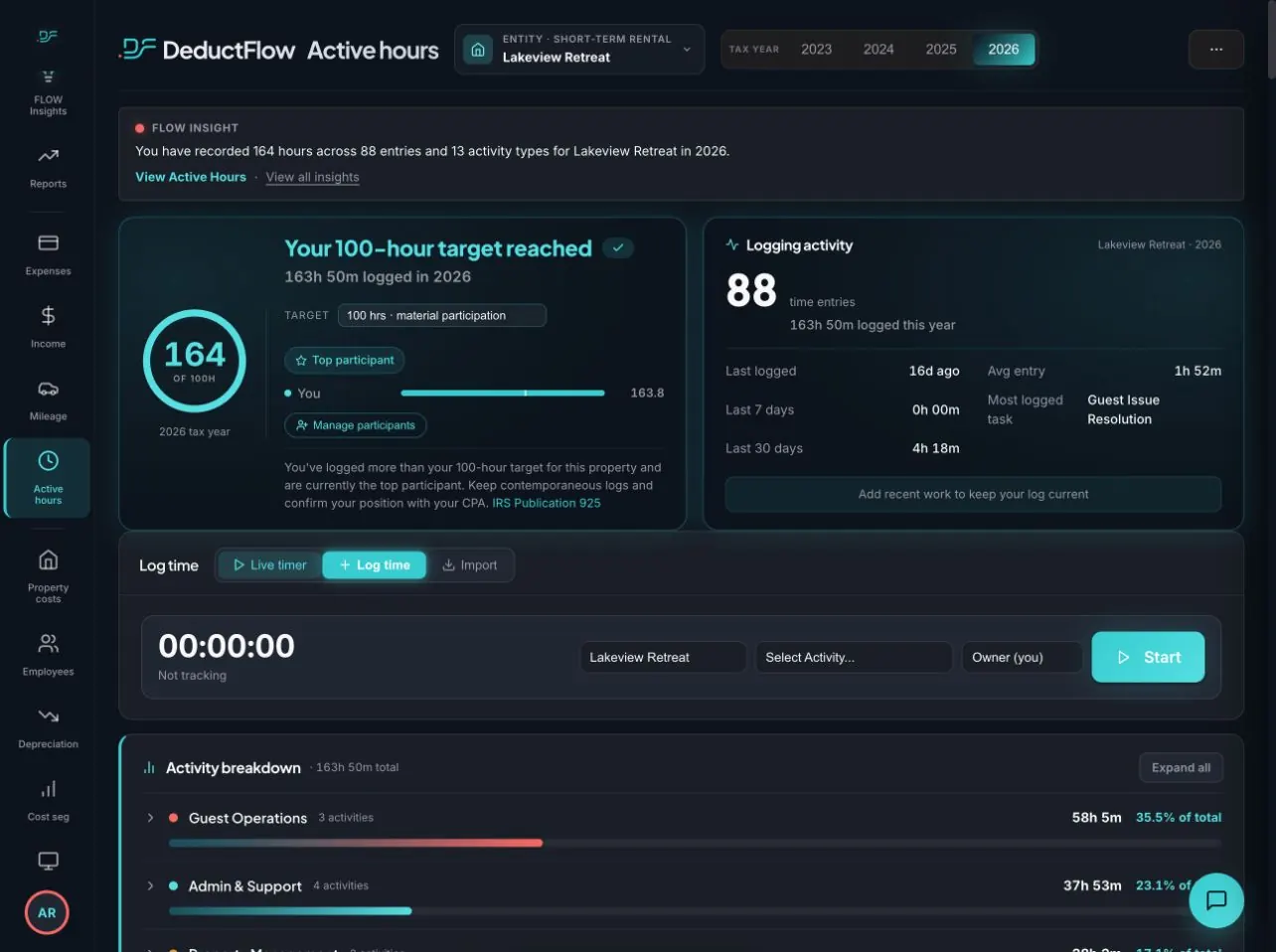
Before paying: try desktop tracking for seven days without a credit card. Reports, exports, and Mobile Companion are excluded from that trial. Start with one property and try recording an expense, a trip, and an activity.
Sources: expense tracking, active hours, mileage, and current plans.
2. Stessa — connected rental finances and portfolio reporting
Stessa lists automatic bank feeds, unlimited properties, mileage expense tracking, and data exports across its plans. Its accountant package and report options vary by tier. It is worth considering if most of your bookkeeping starts with financial-account transactions.
Pricing: Essentials is free. Manage is $15/month or $12/month paid annually; Pro is $35/month or $28/month paid annually.
Check before choosing: the reporting tier you need, receipt-scanning limits, and how you will record owner and helper activity alongside the financial records. Do not assume that mileage tracking supplies a participation log.
3. Baselane — banking and bookkeeping by property
Baselane combines property and entity financial tracking with banking and accountant reports. Its Smart plan lists receipt matching, transaction automation, balance sheets, and depreciation/cost-segregation features. Those features make it more than a basic bank-transaction list.
Pricing: Core has no subscription fee. Smart is advertised at $20/month on an annual plan. Transaction or service fees may still apply.
Check before choosing: which automations and reports require Smart, and how you will maintain mileage and participation records in your overall workflow.
4. QuickBooks Online — broader accounting and accountant collaboration
QuickBooks Online is an option when the accounting workflow itself is the priority. Its published plans include business reports and accountant access; Plus adds class and location tracking. Its mobile app also supports mileage tracking.
Standard monthly prices: Simple Start $38, Essentials $85, Plus $140, and Advanced $340, before temporary promotions. Payroll is an optional addition.
Check before choosing: ask your accountant which plan and property structure they need. A low entry price is not a like-for-like comparison if the reporting workflow requires a higher tier. Plan how activity notes and supporting documents will reach the CPA too.
Sources: QuickBooks plans and mileage tracking.
5. Hurdlr — automatic mileage and self-employed expense tracking
Hurdlr offers free semi-automatic mileage and manual finance tracking. Premium adds automatic mileage and finance tracking. It also supports a timer and manual time entries with business, client, task, and notes fields; time tracking should not be treated as missing from this comparison.
Pricing: its Premium help page lists $100/year or $9.99/month. Confirm the current checkout offer and any higher-tier features you need.
Check before choosing: try grouping your records by rental property and reviewing the resulting time and financial reports. Automatic trip capture and a CPA-ready property activity record are separate things to evaluate.
Sources: Premium features and pricing and time tracking.
6. FreshBooks — invoicing, client work, and accounting reports
FreshBooks is worth considering when invoicing guests or clients is a central part of your business. It offers expense tracking, time tracking, and double-entry accounting reports on eligible plans. It also advertises automatic mileage tracking in its iOS app.
Standard monthly prices: Lite $23, Plus $43, Premium $70; Select is quoted. Promotions can reduce initial charges. Client limits and optional team-member, payment, and payroll costs matter.
Check before choosing: confirm the mobile platform and plan you need, and how you will organize each rental and distinguish owner activity from billable client time.
Sources: FreshBooks plans and accounting features and iOS mileage tracking.
One maintenance visit: what should the software record?
Fictional example: on May 4, you buy a $28.75 cabinet hinge, drive 18 business miles, and spend 45 minutes repairing the rental. You enter the activity the next day. A useful workflow keeps those facts distinct:
- The expense: payment date, vendor, property, category, amount, and the receipt reference.
- The trip: trip date, distance, property, and the reason for travel.
- The work: person, activity date, 45 minutes of work, and a description of the repair.
- The entry date: preserve May 5 as the recorded date rather than making it look like a May 4 entry.
The work duration is separate from the miles driven. Record any travel time separately if needed and ask your tax professional how to treat it. The software should organize the facts without promising that a total establishes tax eligibility.
Both downloads use fictional examples. No account or email required. See expense and mileage previews or read the template instructions.
How this comparison was prepared
We checked the linked vendor product, help, and pricing pages on September 16, 2026. We compared record types, automation, reporting, plan restrictions, and the work needed to organize records by property. This is a review of published capabilities, not a hands-on test of every paid product. The use-case recommendations are our judgment.
The screenshots show our app using fictional demo records. For competitors, we link the source of each feature claim. A general time tracker is not automatically a purpose-built participation log, and an unverified feature is not treated as absent.
Try these checks before switching tools
- Enter one real workflow: use a fictional repair like the example above, including a helper’s time. Check property and person totals.
- Inspect the handoff: ask for a sample export. Can your CPA trace amounts to transactions and distinguish activity dates from entry dates?
- Check the paid boundaries: does the trial include exports, mobile capture, bank connections, and accountant access? Compare those limits before subscribing.
- Plan the move: retain your original spreadsheet, receipts, and prior exports. Test imports and reconcile totals before retiring your old records. Do not assume that every tool transfers attachments or entry history.
If participation records are your main concern, also inspect Field Ledger, which describes connected participation, mileage, trip, and expense records. Compare its actual workflow and exports with the same example. We have not performed a paid-product test.
If your spreadsheet is already reliable, you may only need better habits and supporting-record references. See DeductFlow versus spreadsheets before adding a subscription.
Questions about STR tax tracking software
What is the best STR tax tracking software for Airbnb hosts?
For a host who needs property expenses, mileage, and participation records together, DeductFlow is one option. Consider Stessa or Baselane for connected rental finances, QuickBooks Online for broader accounting, Hurdlr for automatic mileage, and FreshBooks for invoicing. Choose the workflow and reporting plan that match your records.
Does tax tracking software file my Airbnb tax return?
Tracking records and filing a return are different tasks. DeductFlow organizes records and reports for review; it does not prepare or file your return. Confirm filing services separately with any provider and your tax professional.
Can I track rental income and participation hours in the same app?
DeductFlow records income and activity by property. General time trackers also exist in other products, including Hurdlr and FreshBooks. Check whether the workflow keeps people, properties, activity dates, and notes clear in the report you will actually use.
Is there a free spreadsheet alternative?
Yes. DeductFlow provides a free hours-and-expense workbook with fictional examples and supporting-record reference fields. It requires manual entry and does not independently timestamp or verify work.
Can I export a DeductFlow report during the desktop trial?
No. The seven-day desktop trial excludes reports, exports, and Mobile Companion. Those features require paid Pro at $149/year or $24/month. The public sample PDF is free to download without an account.
Your next step
Prove it.
Spend your next 7 days tracking.
Not catching up.
Try DeductFlow desktop tracking for seven days without a credit card. Reports, exports, and Mobile Companion require paid Pro and are excluded from the trial. Pro is $149/year or $24/month.
DeductFlow organizes records. It does not prepare your tax return, determine eligibility, or guarantee deductions. Review tax treatment with your tax professional.