Integration · Updated
DeductFlow and Hospitable
Short answer
What the connection does
Connect Hospitable in DeductFlow and your accepted Airbnb stays import as rental income, matched to the right property, with the Airbnb host service fee recorded as its own expense. It is read-only, it updates when Hospitable reports a new or changed reservation, and it is included with DeductFlow Pro and the seven-day trial.
Imports
- One income record per accepted Airbnb stay, dated by checkout in the property's time zone
- Gross income: accommodation plus the guest fees you keep (cleaning, pet and others), itemized per booking
- The host service fee, as a separate Platform fees expense
- Changes and cancellations to stays already imported
Does not import
- Vrbo, Booking.com and direct bookings
- Listings you co-host but do not own
- Owner stays, and Airbnb-funded promotions
- Taxes the platform collected or you collected (host-collected taxes are flagged, not counted as income)
- Guest contact details, mileage, hours or other expenses
Set it up
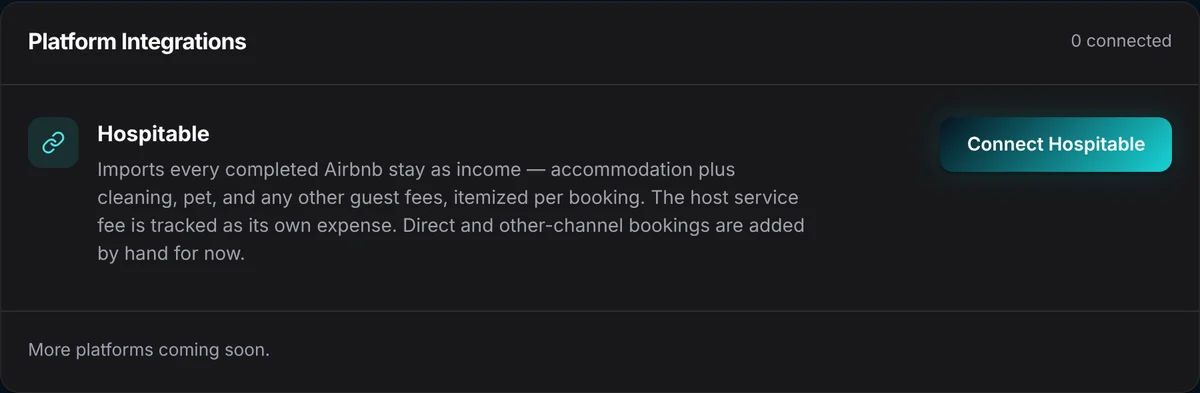
- Open Integrations. In DeductFlow, choose Integrations in the sidebar. The Platform Integrations card lists Hospitable.
- Connect. Choose Connect Hospitable. You authorize Airbnb on Hospitable's page and return to DeductFlow. To create the connection, DeductFlow shares your name and email with Hospitable.
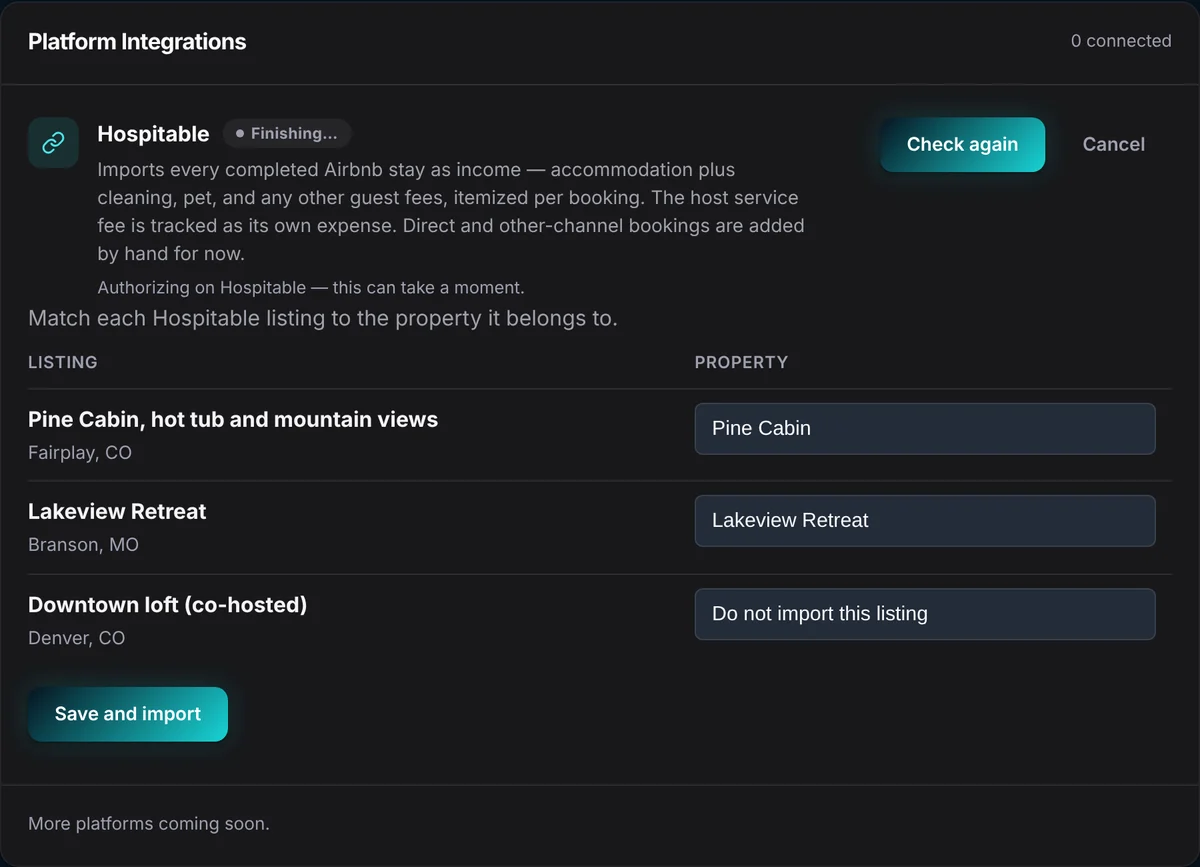
- Match listings to properties. DeductFlow loads your Hospitable listings. Pick the DeductFlow property each one belongs to, or choose "Do not import this listing".
- Save and import. The first import runs right away and covers the current and prior tax year.
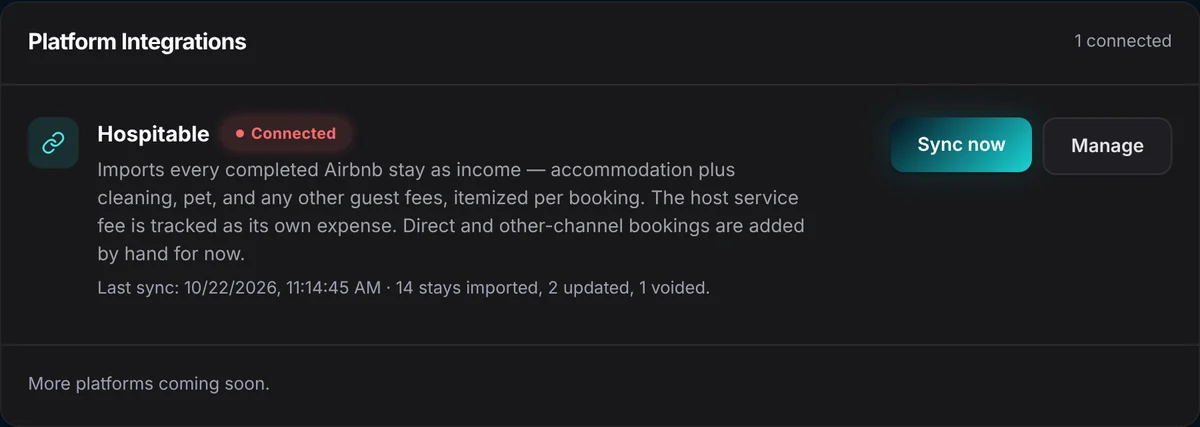
- Review. Imported stays appear in Income with the host fee under Expenses. The card shows the last sync and how many stays were imported, updated or voided.
When it syncs
- When Hospitable notifies DeductFlow that a reservation was created or changed, DeductFlow re-reads that reservation and updates its records.
- Press Sync now at any time, up to six times a day.
- A changed reservation updates its income and fee in place. A cancelled stay is removed. Unchanged reservations are left alone, so nothing is duplicated.
- Amounts come from what Hospitable has received from Airbnb, so a very recent stay can take time to show final figures.
Editing, history and disconnecting
- While connected, an imported stay's amount and date stay in step with Hospitable. You can delete an imported stay; it will not come back on the next sync.
- Each imported record's history shows it was written by the Hospitable sync, alongside the date DeductFlow first received it.
- Rows you entered by hand are never touched by the sync.
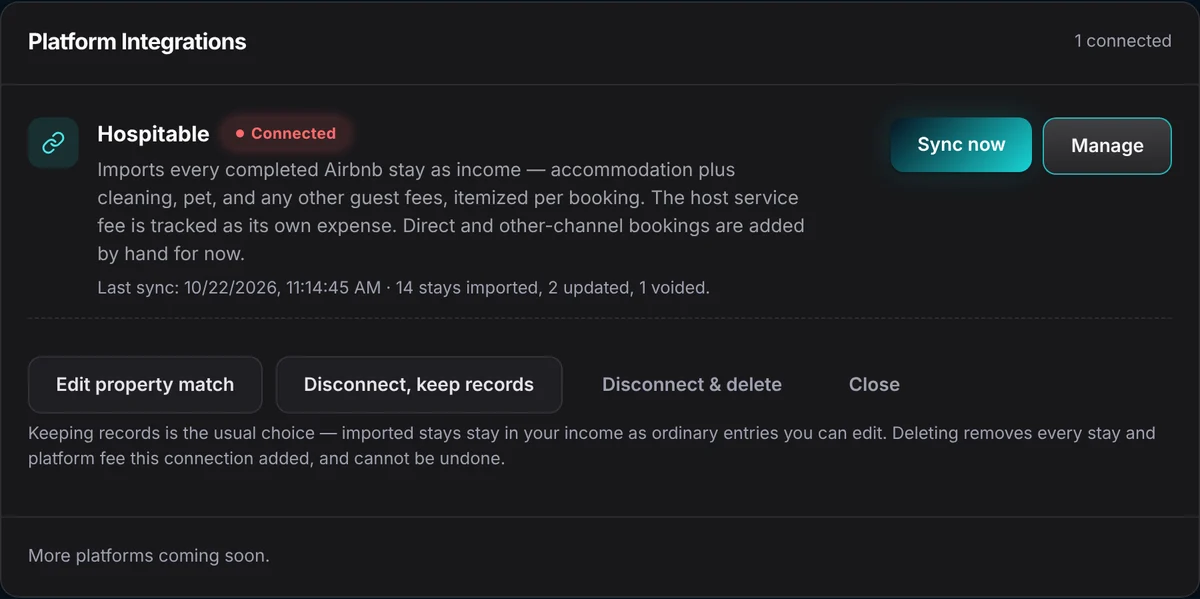
- Disconnect, keep records (the usual choice) leaves imported stays as ordinary, editable income. Disconnect & delete removes every stay and fee the connection added and cannot be undone.
Limits to know
- Airbnb listings you own. Co-hosted listings are not imported.
- One Hospitable connection per DeductFlow account.
- No currency conversion: a booking in a different currency from its property is skipped.
- If Hospitable's line items do not add up to its payout figure, the stay still imports at gross and is flagged for review.
- Other channels: add income by hand, or import an Airbnb, Vrbo or Booking.com earnings CSV on paid Pro.
Guesty, Hostaway, OwnerRez and others
DeductFlow does not connect to Guesty, Hostaway, OwnerRez or Lodgify today. If you use one of them, record income by hand or with an earnings CSV, and keep using DeductFlow for hours, mileage, expenses and the CPA package.
Related
Imported income lands in the same CPA package as your hours, trips and receipts. Seven-day desktop trial with no credit card. Reports, exports and the Mobile Companion require paid Pro and are not part of the trial. Pro is $149 a year, billed annually, or $24 billed monthly.
Import income from an Airbnb or Vrbo CSV · All integrations and partners
Questions, answered.
Which plans include the Hospitable connection?
DeductFlow Pro and the seven-day trial. The Free plan does not include it. If a trial ends without upgrading, syncing pauses and imported records stay in place.
Does DeductFlow import Vrbo or Booking.com stays through Hospitable?
No. The connection imports Airbnb stays from listings you own. Add other channels by hand or import their earnings CSV (paid Pro).
Does DeductFlow change anything in Hospitable?
No. The connection is read-only. DeductFlow never writes back to Hospitable and does not store guest names, emails or phone numbers.
Can I edit an imported stay?
While connected, an imported stay's amount and date stay in step with Hospitable. You can delete an imported stay; it will not be imported again. After you disconnect and keep records, imported rows become ordinary entries you can edit.
Does DeductFlow integrate with Guesty, Hostaway or OwnerRez?
Not today. Hospitable is the only booking-platform connection. Owners on other systems can add income by hand or import an earnings CSV.
Prove it.
Start with your next receipt, hour, or mile.
Seven-day desktop trial with no credit card. Reports, exports and the Mobile Companion require paid Pro and are not part of the trial. Pro is $149 a year, billed annually, or $24 billed monthly.
Start your desktop trialDeductFlow organizes records. It does not determine tax eligibility or guarantee deductions. DeductFlow and Hospitable are separate companies.