
Track your monthly STR cash flow
A quick read on how each short-term rental is performing, built from the bookings, expenses and mortgage you already keep in DeductFlow.
Included in the 7-day trial, with no credit card
Connect your bookings or import a CSV
Connect Hospitable and your Airbnb stays arrive as income on their checkout dates, with the host fee recorded as an expense. Earnings CSV files from Airbnb, Vrbo and Booking.com import on Pro, and the mortgage payment is entered once.

See where the money went
The breakdown runs for a single year or all time, and for one rental or all of them together.

Compare money in with money out
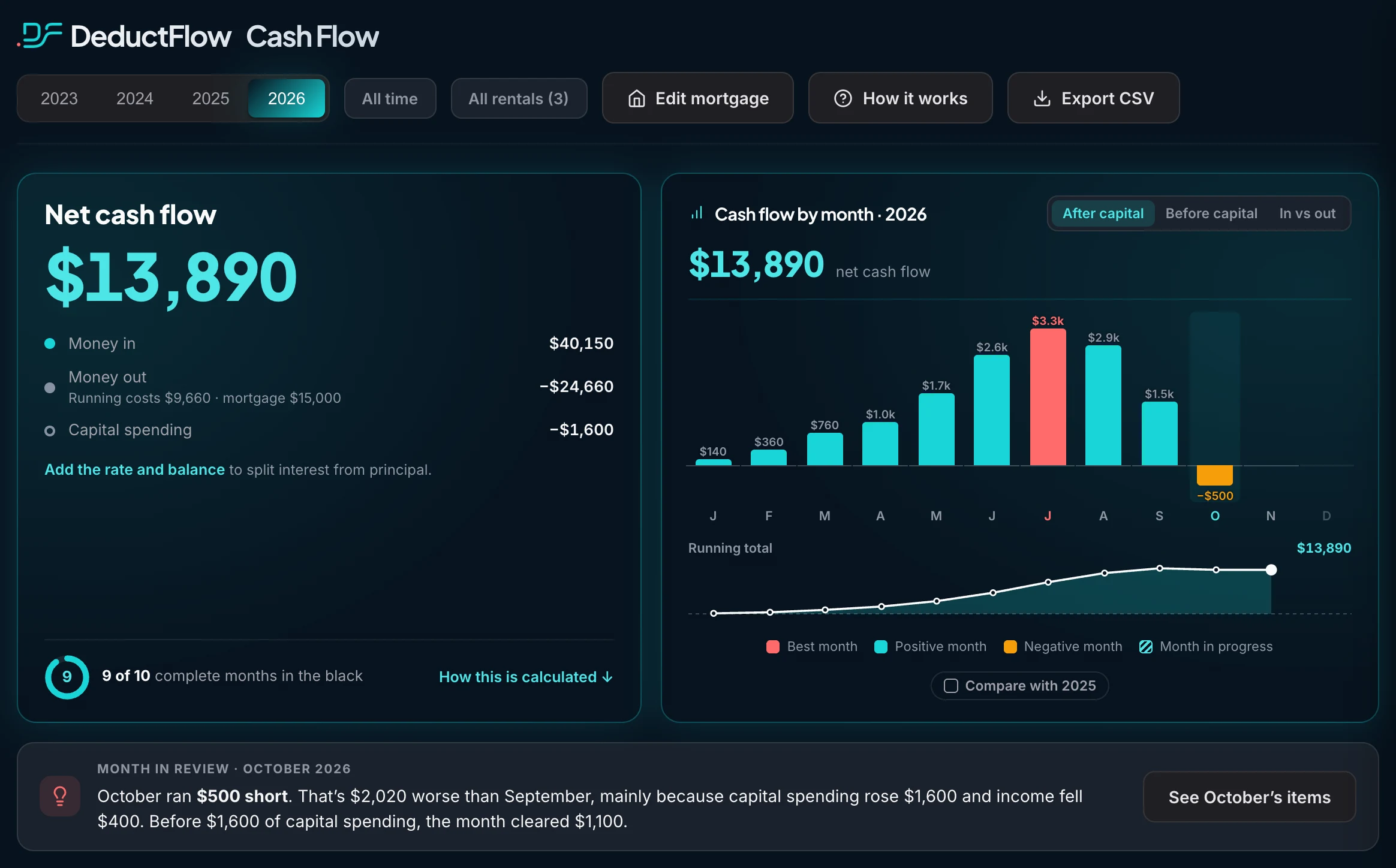
One chart switches between net cash flow, with or without big purchases, and money in against money out with your loan payment drawn across the year.

To review how the whole rental strategy performed, WealthBuilt adds the principal you paid down to the cash the rental kept.
Questions about short-term rental cash flow
How do you calculate cash flow on an Airbnb?
Take the rental income recorded for the period, subtract operating costs and the full mortgage payment, then subtract any capital purchases. For the year shown on this page, $40,150 of income less $9,660 of operating costs, $15,000 of mortgage payments and $1,600 of capital spending leaves $13,890 of net cash flow.
Where do the numbers in the report come from?
Cash Flow reads the income, expenses, employee payments and assets you record in DeductFlow, along with the mortgage entered on the property. Income includes Airbnb stays imported through Hospitable, earnings CSV files from Airbnb, Vrbo and Booking.com, and entries you add by hand, and the report never edits any of these records.
Does Cash Flow work with Vrbo, Booking.com and direct bookings?
Yes, although the Hospitable connection itself imports Airbnb stays only. Vrbo and Booking.com income comes in through an earnings CSV on Pro, direct bookings are added by hand, and the report shows income by channel.
Does the report include mortgage principal?
Yes, the whole payment counts as money out, principal included, because all of it leaves your account. If you enter the loan’s rate and balance, the report splits each payment into interest and principal and shows the principal you paid down, and escrow and mortgage insurance appear as their own lines when the loan has them.
What counts as operating costs and what counts as capital spending?
Operating costs are the expenses you record, grouped by category or by vendor, along with payments to employees and contractors. Capital spending is anything recorded in Assets & Depreciation, counted at its cost in the month it was placed in service, and the chart can show each month before or after it.
Will my mortgage, property tax or insurance be counted twice?
No, an expense recorded as a mortgage payment starts switched off when the loan on the property already counts that month, and property tax or insurance covered by the loan’s escrow starts switched off for the same reason. The building’s purchase price starts switched off too, since most of it is usually the mortgage, and you can switch any of them back on.
Can I leave an expense out of the report?
Yes, every income and expense record has its own switch, and so does each category, vendor and booking channel. Switching one off takes it out of the totals without changing the record, and Restore all brings everything back.
How does Month in review work?
Pick a finished month on the chart and Month in review compares it with the month before, then names the changes that moved it most, such as a rise in capital spending or a drop in income. A button beside it lists the records counted in that month.
Can I see all of my rentals together?
Yes, with two or more rentals the All rentals view adds them together, and All time covers everything since your first record instead of a single year.
Can I compare this year with last year?
Yes, once last year’s records are in DeductFlow, Compare with last year draws the same months from that year over this year’s bars.
Why doesn’t the month match my bank statement?
The report follows the dates on your records instead of the dates money moved at the bank. Stays from a connected booking platform count on the checkout day, other income counts on the date on its record, mortgage payments follow the loan entered on the property, and a capital purchase counts at its recorded cost on the asset’s placed-in-service date. Cash Flow is a management view of your records, not a bank reconciliation, so use your bank and lender statements to confirm what actually moved.
Is cash flow the same as the profit on my tax return?
No, Cash Flow leaves taxes out. It counts the whole mortgage payment and the full cost of a capital purchase and ignores depreciation, while DeductFlow’s tax figures and CPA reports are kept separately and are never changed by it.
Is this a calculator for a property I’m thinking about buying?
No, Cash Flow tracks a rental you already own from the income, expenses, loan and assets you record, and it does not project rents, occupancy or returns for a purchase.
Is Cash Flow included in the trial?
Yes, Cash Flow is included in the 7-day trial with no credit card, and in Pro at $149/year or $24/month. On the Free plan it shows a sample property instead of your own records.
See how your rental is performing
Get started with DeductFlowIncluded in the 7-day trial, with no credit card